*NOTE - For compliance and legal liability purposes, the API is turned off by default for ELXComplete clients. Please contact support for assistance.
The CMS currently has support for AVS support by requiring verification on purchase.
As of right now, the system has inline integration of VerifyMy, PrivateAV, and BlueCheck AVS services.
The software also supports adding any AVS service of your choosing via a customization API.
* IMPORTANT - We do not provide support for any 3rd party coding or modification to any files or website components. By implementing or utilizing a product or service that does not have a native implementation in your software, you will be responsible for any and all required updates or fixes. At our discretion, should we choose to provide support for problems arising from an outside party breaking our software or your website, any related work will be quoted for at a rate of $350 per hour.
Information and instructions for API based implementation:
Make sure AVS is turned on and set to the custom API
Within the admin panel, under global settings, check the AVS section and make sure that AVS detection is on and the provider is set to a custom API.
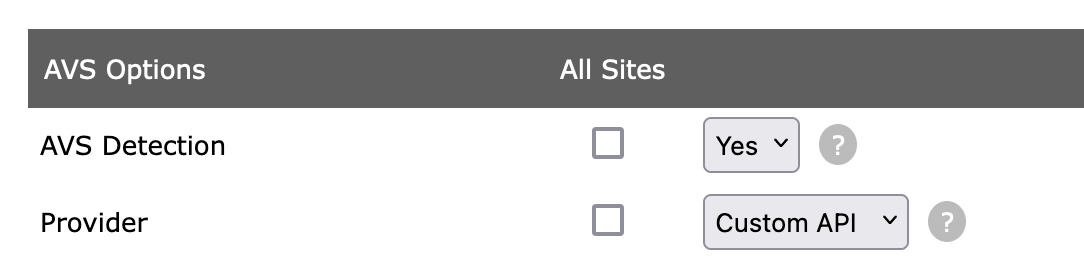
In cmsinclude.ini.php, add a link to the file that will contain your functions
At the top of cmsinclude.ini.php, you'll want to make sure you include an extra file that will contain your API handling:
;<?php exit;?>
[requires]
require[] = "$_SERVER[DOCUMENT_ROOT]/cms_admin/includes/alwaysexec.php"
require[] = "$_SERVER[DOCUMENT_ROOT]/cms_admin/includes/membersMain.class.php"
require[] = "custom_avs.php"
In this example, the custom_avs.php will include your functions.
Implement custom_avs_redirect() and custom_avs_confirm()
Here is an example implementation that implements VerifyMyAge via the custom API.
custom_avs_redirect() determines the URL to redirect endusers to for verification.
custom_avs_confirm() is the URL that endusers direct back to that checks this information.
Returning 1 in this function will flag the user as verified within the CMS.
function custom_avs_redirect($redirect_page = 0){ $client_id = "[CLIENT_KEY]"; $client_secret = "[CLIENT_SECRET]"; $rurl = (isset($_SERVER['HTTPS']) && $_SERVER['HTTPS'] === 'on') ? "https://" : "http://"; $rurl .= $_SERVER['HTTP_HOST']; // Append the requested resource location to the URL $rurl .= dirname($_SERVER['REQUEST_URI']) . "/avs_confirm.php"; $env_url = "https://sandbox.verifymyage.com"; // $env_url = "https://oauth.verifymyage.com"; // live URL $url = $env_url . "/oauth/authorize" . "?client_id=$client_id&scope=adult&country=us&redirect_uri=" . urlencode($rurl); return $url;}
function custom_avs_confirm(){ $client_id = "[CLIENT_KEY]";
$client_secret = "[CLIENT_SECRET]"; if (empty($_GET["code"])) { // no code, so start the process again. $url = custom_avs_redirect($redirect_page = 1); header("Location: $url"); flush(); exit; } $env_url = "https://sandbox.verifymyage.com"; // $env_url = "https://oauth.verifymyage.com"; // live URL $code = $_GET["code"]; $headers = [ 'Content-Type: application/json', 'Authorization: Basic ' . base64_encode($client_id . ':' . $client_secret) ]; $ch = curl_init(); curl_setopt($ch, CURLOPT_URL, $env_url . "/oauth/token"); curl_setopt($ch, CURLOPT_RETURNTRANSFER, 1); curl_setopt($ch, CURLOPT_POSTFIELDS, json_encode( ["code" => $_GET["code"]] ) ); curl_setopt($ch, CURLOPT_POST, 1); curl_setopt($ch, CURLOPT_HTTPHEADER, $headers); $result = curl_exec($ch); $result = json_decode($result); $ch = curl_init(); curl_setopt($ch, CURLOPT_URL, $env_url . "/users/me?access_token=" . $result->access_token); curl_setopt($ch, CURLOPT_RETURNTRANSFER, 1); $rss = curl_exec($ch); $rss = json_decode($rss); if ($rss->age_verified) return 1; return 0;}Some common questions
1: "Where/how does GeoIP detection occur in Elevated X?"
Yes. It is supposed to serve separate AVS pages / templates based on whether or not the enduser is accessing the site from
an area that requires AVS.
For example:
If the system detects the user is coming from an AVS area (and isn't authorized), it will load:
-
/avs/AVS_loggedin.tpl
or -
/avs/AVS_notloggedin.tpl
instead of the the regular expected template file.
2: "Does $area['AVS'] reflect GeoIP filtering, or just that AVS is globally enabled?"
No. $area["AVS"] is the type of AVS area that is used. As of right now,
only mode 3, which is "Show SFW Landing Page" is and the only functionality we're supporting right now.
3: "Debug panel does not show geo info"
Individual region info isn't available within the variable list there. The only thing the CMS cares about in this case is whether
or not it's serving a page for AVS people or not.
4: "Is there a variable or function to check visitor region?"
Not within the CMS directly, however, your templates can potentially use the below variables once the system is configured.
The only thing the system is doing here is serving different templates based on whether or not enduser is in AVS required area or not.
5: The system needs one of the following variables to be defined:
-
$_SERVER["GEOIP_REGION_CODE"]
-
$_SERVER["GEOIP_REGION"]
-
$_SERVER["GEOIP_REGION_NAME"]